

FAQs
SPL represents our path to Saudi Post's transformation, highlighting our vision as a leading national group in providing logistics and postal services that deliver added value to our customers and serve as the link between Saudi Arabia and the world.
SPL" is the new identity of Saudi Post, with a contemporary and new spirit, appearance, and vision in line with the future phase nature and the requirements.
Saudi Post "SPL" is still a government sector, but the transformation strategy is one of the key steps to transform the business model into a commercial-based business.
Yes, "SPL" provide the same products provided by Saudi Post while seeking to add and develop more postal and logistics products and services to keep pace with global changes to satisfy our customers of individuals and both government and private sectors.
Yes, the customer can login to his account with the same id.
Certainly, all our customers can benefit from Saudi Post branches' services with the old or new logo.
Part of the development will include changing the titles of our accounts in order to be in line with the transformation and development of customer service, to be as follows:
• Website www.splonline.com.sa
• Smartphone App to be SPL online
• My Post Online to be SPL online
• Twitter SPL Account @SPL_KSA_online
• Instagram SPL Account SPL_KSA_online
• Facebook SPL Account SPL.KSA.online
• LinkedIn SPL Account SPL-KSA-online
• Twitter Customer care @SPL_care
No, there is no change with the new Identity implementation
There is no need to update pre-concluded contracts, but the new identity will be inserted in the current and future contracts and agreements because rights and obligations didn't change; only the logo changed.
Yes, the service is available as a standalone service
Yes, the staff will present the suitable options based on your parcel
Currently, bundles are only available for purchase through SPL branches in Riyadh region
For larger quantities, please contact your nearest SPL branch for availability and assistance
To receive mail addressed to the mailbox, whether internal or external
For individuals: 130 riyals for the primary fund member and a 30 riyal fee for adding a member. For institutions: 650 riyals for the primary fund and 130 riyals for the secondary fund. For companies: 1300 riyals for the primary fund and 390 riyals for the secondary fund. For government entities: 1300 riyals for the primary fund and 390 riyals for the secondary fund. For charitable organizations: 650 riyals for the primary fund and 130 riyals for the secondary fund.
The box cannot be transferred, but the remaining subscription period can be used for a box available at another office.
Transfer not included
If the shipment is held at the counter, you need to access SPL Online or the SPL app and then select (Change Shipment Destination)
To find out the estimated delivery time of your shipment, please visit the following link: https://splonline.com.sa/ar/price-calculator
To find out the shipping fees, please visit the following link: https://splonline.com.sa/ar/price-calculator
To find out which items are prohibited from being shipped, please visit the following link: https://splonline.com.sa/ar/prohibited-items Or contact customer service on the toll-free number (19992)
If the document is paid for and rejected by the source, a report should be filed through the call center (19992).
3 to 5 days working days after we receive the document from the source
We offer international shipping to almost 190 countries. To confirm service availability to a specific destination, please visit your nearest SPL branch or check our website
Express shipping is the fastest option with a higher service level, while Economy shipping is more cost-effective with relatively longer delivery times. Sea Freight is the lowest-cost option but requires extended transit times and is currently limited to a few destinations.
It depends on the service and destination.
Once a shipment is dispatched, changing the destination is not possible.
Yes, our services support customer-to-customer (C2C) international shipments.
Express, Economy and Sea Freight: up to 30 kg.
Based on service type, destination, and either actual or volumetric weight.
Prohibited items include but not limited to cash, jewelry, hazardous materials, etc..
Yes, you need to provide basic shipment details like the item description, value, and receiver information. A simple invoice may be required. Also, additional documents such as ID or a packing list might be needed.
No, these are set by the destination country and are paid by the receiver.
You'll receive a tracking number to monitor your shipment via the SPL website https://splonline.com.sa/en/shipmentdetailsstatic/or support.
Contact customer support with your tracking number for assistance.
Once shipped, cancellation is not possible. Refunds are subject to policy.
From any SPL branch offering international services.
Alami Service gives you 11 addresses in 11 different countries for free, allowing you to shop from international stores and have them shipped at the cheapest prices to your national address.
- Competitive prices
- 11 addresses in 11 different countries
- Flexible delivery methods (national address – post office – parcel station)
- 30-day package consolidation
- US tax-exempt address
Once you obtain a national address, you have Alami service.
Prices vary by country, and you can find out more by visiting this link: https://splonline.com.sa/ar/alami-page/ There are no subscription fees for the Alami service.
Once shipments arrive through the Alami page, you can send them all at once with a single shipping order, and the shipments must be within the same country.
Once you copy your Alami address from the Alami page and place it in the Purchases address, we will receive your shipment at the selected address when it is delivered by the merchant.
30 days, after which the warehouse destroys the shipment.
11 addresses in 11 countries around the world
Prices vary by country, and you can find out more by clicking here: https://splonline.com.sa/ar/alami-page/
The order is processed through the customer's account by specifying a return address or providing a return label, and the return request is made via a Alami control panel.
- Via Virtual assistant (Maha chatbot) in web or application or via whatsapp through the below number: 0112898888
- Via logging into your account in SPL website or application, then viewing your addresses.
- Via Tawakalna App.
- Via Absher Website.
- Via Noor platform.
It means that the national address could not be verified, no longer has a reference in the national address maps, or is no longer associated with the user.
Steps to register in the National address:
through SPL Online website :
Go to SPL Online website.
Log in to the account with your username/Personal ID and password. Or through Nafath
Click on the national address, then click on Add Address button :

Fill in the required data (selection of the site - building details - review and confirmation).
through SPL App.
Open SPL App.
Log in to the account with your username/personal ID and password. Or through Nafath
In My National Addresses, click of ""view more""
Click on the Add Address (+).
Fill in the required data (selection of the site - building details - review and confirmation).
Your National address will be reflected in the National address page.
The maximum number of national addresses allowed for a user is:
For a citizen: 4 addresses.
For the resident: 2 addresses.
In the event that one of the national addresses is deleted after the user has reached the limit, the user can add a new national address after 6 months of deleting the last national address.
Steps to modify the national address:
through SPL Online website:
Open the SPL Online website.
Log in to the account with your username/Personal ID and password. Or through Nafath
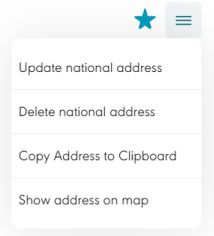
Click on the national address, then click on  for the address you want to be modified.
Click on the Edit.
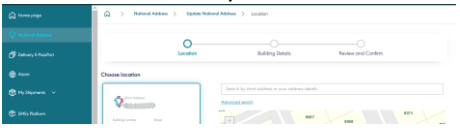
Fill in the required data (selection of the site - building details - review and confirmation).
through SPL App.
Open SPL App.
Log in to the account with your username/personal ID and password. Or through Nafath
Click on the addresses, then click on view more.
Click on  for the address you want to be modified.
Click on the Edit from options list :

Fill in the required data (selection of the site - building details - review and confirmation).
Steps to delete the national address:
through SPL Online.
Go to SPL Online.
Log in to the account with your username/Personal ID and password. Or through Nafath
Click on the national address and then click on  for the address you want to be deleted.
Click on Delete.
Click on confirming the deletion of the national address.
through SPL App:
Open SPL App.
Log in to the account with your username/Personal ID and password. Or through Nafath
Click on the addresses, then click on view more.
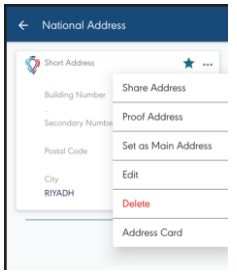
Click on for the address you want to be modified.
Click on Delete from drop down menu:
Click on confirming the deletion of the national address.
The user must have at least one national address, that means the last national address cannot be deleted.

Steps to add dependents to the national address:
through SPL Online.
Go to SPL Online.
Log in to the account with your username/personal ID and password. Or through Nafath
Click on the national address.
Click on the address details and then click on Add dependent.
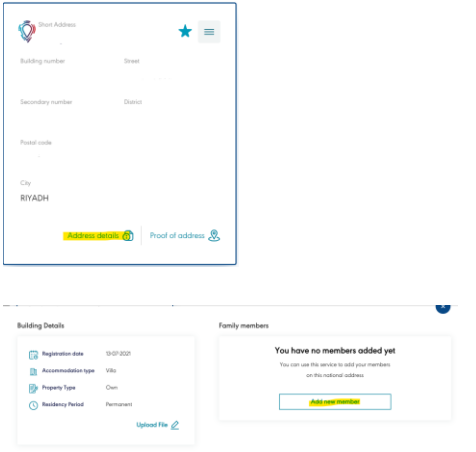
Fill in the required information (ID number- DOB- mobile number - relationship).
through SPL App.
Open SPL App.
Log in to the account with your username/personal ID and password. Or through Nafath
Click on the addresses, then click on view more.
Click on the address you want to add dependent on it, then click on the dependent tap.
Click on Add dependent (+).
Fill in the required information (ID number- DOB- mobile number - relationship).
Steps to delete dependents from the national address:
through SPL Online.
Go to SPL Online
Log in to the account with your username/personal ID and password. Or through Nafath
Click on the national address.
Click on the address details and then click on delete dependent.
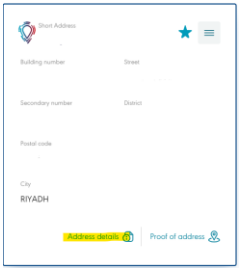
Fill in the required information (delete reason).
Click on confirming the deletion of the dependent.
through SPL App.
Open SPL App.
Log in to the account with your username/personal ID and password. Or through Nafath
Click on the addresses, then click on view more.
Click on the address you want to delete dependent from it, then click on the dependent tap.
Click on  for the dependent you want to be deleted.
Fill in the required information (delete reason).
Click on confirming the deletion of the dependent.
A dependent cannot be deleted if a citizen is more than or equal to 18 years old, and does not have any other national address (the dependent must add another national address in order for the owner of the main address to delete it).
The maximum number of dependents for a national address is:
For the citizen: 11 followers.
For the resident: 4 dependents.
If a dependent is deleted after the user has reached the maximum limit, the user can add a new dependent after 6 months of deleting the oldest dependent.
Steps to modify the mobile number added to the national address:
through SPL Online.
Entering through Nafath.
Log in with your customer ID number and password
Click on Edit Personal Information, then Edit Mobile Number.
through SPL app.
Entering through Nafath.
Log in with your customer ID number and password
Click on account, then click on the Personal Information
Edit Mobile Number.
Steps to update the National Address status from “Suspended” to “Active”:
Through SPL Online website:
1. Open the SPL Online website.
2. Login to the account with your username/Personal ID and password. Or through Nafath
3. Click on National Address, then click on ( ) for the address you want to be activated.
4. Fill in the required data (selection of the site – building details – review and confirmation).
Through SPL App:
1. Open SPL App.
2. Log in to the account with username/Personal ID and password. Or through Nafath
3. Click on (Menu), then click on National address.
4. Click on () for the address you want to be activated.
5. Fill in the required data (selection of the site – building details – review and confirmation).
Steps to print proof of National Address:
Through SPL Online website:
1. Open the SPL Online website.
2. Login to the account with your username/Personal ID and password. Or through Nafath
3. Click on National Address, then click on ( ) for the address you want to print the proof for.
Through SPL App:
1. Open SPL App.
2. Log in to the account with username/Personal ID and password. Or through Nafath
3. Click on (Menu), then click on National address.
4. Click on () for the address you want to print the proof for.
Through virtual assistant (Maha chatbot):
1. Open the virtual assistant (Maha Chatbot) through the SPL Online portal, mobile app, or by calling the following number: 0112898888
2. Select the service type: “Request Proof of Address”
3. Enter the national ID number or Iqama number
4. Enter the OTP sent to the mobile number registered in SPL Online
5. If multiple addresses are available, select the address for which you want to print the proof.
Through Tawakalna App.
Steps to change the main address:
Through SPL Online website:
1. Open the SPL Online website.
2. Login to the account with your username/Personal ID and password. Or through Nafath
3. Click on National Address, then click on ( ) for the address you want to set as the main address
4. Click on ( )
)
5. Click on confirming set as main address
Through SPL App:
1. Open SPL App.
2. Log in to the account with username/Personal ID and password. Or through Nafath
3. Click on (Menu), then click on National address.
4. Click on () for the address you want to set as the main address
5. Click on ()
6. Click on confirming set as main address
It is a service that enable you to request a physical plate that displays your short address to be installed in your house entrance
Citizens and Residents who are registered in National Address.
Currently, the service is available for Villa/Duplex properties only.
Currently, government entities and businesses are not covered in the service via the website yet, please contact SPL Sales team.
Steps to order physical plate:
Through SPL Online website:
1. Open the SPL Online website.
2. Login to the account with your username/Personal ID and password.
3. Click on National Address, then click on ( ) for the address you want request a physical plate for.
4. Click on ( )
)
5. Select the design
6. Pay the fees
7. A confirmation message will be sent with your order number and support channels.
Yes, you can order up to 3 plates for your house
The fee is 166.75 including VAT. And it includes making the plate, delivering it to your doorstep, and installing it
10 – 15 business days
There is a variety of designs. Check the website to explore your options
Steps to track physical plate order:
Through SPL Online website:
1. Open the SPL Online website.
2. Login to the account with your username/Personal ID and password.
3. Open National Address page
4. Clicks on ( )
)
5. You will see a summary of your orders and the status for each
Please contact SPL Customer Service
National Address Registration is one of the ways to define the official business addresses of each legal entity, which includes all official communications and regulatory implications, including legal transactions, contracts and licenses, and judicial and security summonses. According to the Council of Ministers Resolution 252, It includes the following services: address registration, address renewal, address update, and printing Proof of Address
Steps to register for official business address service:
Through the Business Platform provided by the Saudi Business Center, where you can register for the National Address during the issuance of the commercial registration.
Through SPL Online website:
1. Open the SPL Online website.
2. Log in to account with your username/Commercial registration number/license and password
3. Click on the national address, then click on Add Address.
4. Fill in the required data (selection of the site - building details - review and confirmation).
5.
Through SPL App:
6. Open SPL App.
7. Log in to account with your username/Commercial registration number/license and password
8. Click on (Menu), then click on National address.
9. Click on the on Add Address (+).
10. Fill in the required data (selection of the site - building details - review and confirmation).
Via SPL online or SPL App or via customer service by calling the free number 19992 and from outside the Kingdom +966112898888 or by e-mail Care@SPLonline.com.sa
The national address of Official Business Address subscribers cannot be deleted, but the address can be modified
Steps to modify the Establishment address for official business address service subscribers:
Through the Business Platform provided by the Saudi Business Center, where you can register for the National Address during the update of the commercial registration.
Through SPL Online website:
1. Open the SPL Online website.
2. Log in to account with your username/Commercial registration number/license and password
3. Click on the national address, then click on ( ) for the address you want to be modified.
4. Click on the Edit.
5. Fill in the required data (selection of the site - building details - review and confirmation).
Through SPL App:
1. Open SPL App.
2. Log in to account with your username/Commercial registration number/license and password
3. Click on (Menu), then click on National address.
4. Click on () for the address you want to modify.
5. Click on the Edit.
6. Fill in the required data (selection of the site - building details - review and confirmation).
Steps to renew an establishment’s subscription:
Through the Business Platform provided by the Saudi Business Center, where you can register for the National Address during the renew of the commercial registration.
Through National Address Platform:
1- Open the National Address Website.
2- Login to the account with your username/commercial registration number/license and password.
3- Click on (list) then click on (My Addresses)
4- Click on (Renew) on the expired address.
5- Pay the necessary fees by clicking( Start Payment).